![SMPTE_logoWHITE-RGB-2.png]](https://www.smpte.org/hs-fs/hubfs/SMPTE_logoWHITE-RGB-2.png?height=40&name=SMPTE_logoWHITE-RGB-2.png)
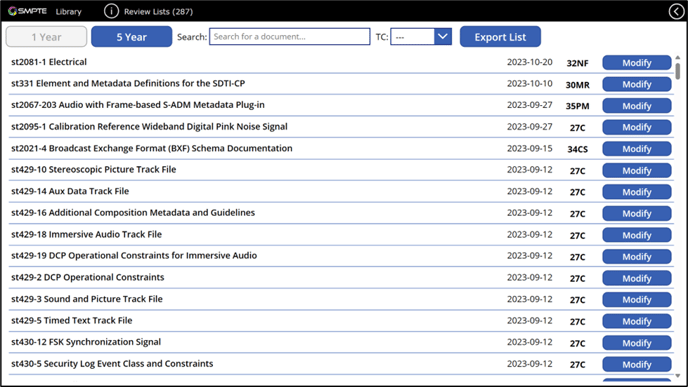
The Library App supports TC chairs in conducting 1- and 5-year reviews. It provides a view with two lists, one for 1-year reviews and one for 5-year reviews. To get to the view click on the ‘Review Lists’ button which is locate in the upper right corner on the Library App main screen. The ‘1 Year’ and ‘5 Year’ buttons can be used to switch between documents up for 1-year review and documents for 5-year review. The list of documents contains all documents that have not had their 1- or 5-year review and were published either one or five years ago. TC chairs can use the ‘Modify’ next to a document to modify the state of a document. A TC chair is only able to modify the state for documents that belong to his/her TC.
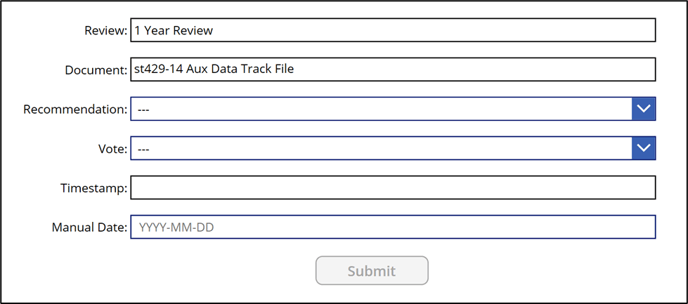
On the review screen for a document, the TC chair can select the recommendation as determined by the review and as approved by his TC. To submit the recommendation the TC chair has to also submit the date of a rollcall or an online vote in which the TC approved the recommendations. For legacy reasons it is currently also allowed to submit a date for documents where a recommendations was made but the recommendation was not recorded in the SMPTE database. The Timestamp field can be used for that. After submitting the data, the ‘Modify’ button will be greyed out on the review list screen. The document will be removed from that list once it gets recorded into the home office metadata records.
The 'Export' button on the top of the screen provides a way for the TC chair to export a EXCEL spreadsheet with all 1- and 5-year review documents. An email with a link to the spreadsheet location will be send to the TC chair after clicking the button.
TC Review Process Steps:
- The TC chair exports a list of 1- and 5- year review documents from the 1- and 5-year review screen by clicking the 'Expert' button before a TC Plenary .
- The TC chair provides the EXCEL spreadsheet to the TC members before or brings it up during the TC Plenary to give TC members and opportunity to review the lists.
- The TC chair either sets up an Ad Hoc group (AHG) or asked for volunteers to review the lists following the TC Plenary.
- The volunteers or the AHG make recommendations on the documents in the list for the next TC Plenary if possible. See clause 6.14 of the Standards OM for allowed recommendations.
- The TC chair brings up the recommendations during the next TC Plenary and conducts a rollcall vote to approve the recommendations. Alternatively, a TC chair can conduct an online written consensus vote via the Voting App after the TC meeting.
- The TC chair can enter the approved recommendations for 1- and 5-year review documents by clicking the 'Modify' button next to the name of document in the Library App document list on the 1- and 5-year review screen.
Please make sure to review clause 6.14 of the Standards OM for more details of the review process. The provisions in the Standards OM prevail if there is a conflict to the provisions in this document.
Additional Notes on Review Lists:
- Because the App is based on the GitHub Document Library any modification of a document state on the 1- & 5-year review screen will NOT be visible in the Library App and applied to the GitHub document library repo immediately.
- It will create a GitHub Pull Request which has to be reviewed by staff and then manually closed and merged into GitHub document library as a safety mechanism.
- The Library App will be regularly updated with any modifications once the Pull Request is approved and merged.
- That means, there will be a delay between when the modification is submitted and when the modification becomes visible in the Library App.
- The "Modify" button will be disabled (greyed out) once the state for a document in the list on the 1- & 5-year review screen was submitted. The document will remain in the list until the Library App was updated and then disappear.
- Please be aware that the data shown in the App is live data. Any modification will affect actual data in the GitHub Library app. Please feel free to update the state of your review document but keep in mind that you should use the actual state as approved by the TC in a consensus vote and not random/dummy data.