![SMPTE_logoWHITE-RGB-2.png]](https://www.smpte.org/hs-fs/hubfs/SMPTE_logoWHITE-RGB-2.png?height=40&name=SMPTE_logoWHITE-RGB-2.png)
Document search is available on the main screen of the app through the search bar on top.

Please note, the initial screen is blank until you clicked the "Search" button.
You can search for file name or Doc ID and filter for Microsoft team, document location (SharePoint or GitHub), project, document type, or if the file was deleted. Files can be sorted by several values in ascending or descending directions. Including no search criteria will return a subset of all of the files and repositories on the SKN.
Please note, that displaying the search results can take a while depending on how broad the search is which is being conducted. The search result list is limited to 2000 items. It is advised to be more specific in your search.
Please note, the document location is indicated by either a SharePoint logo or a GitHub logo.
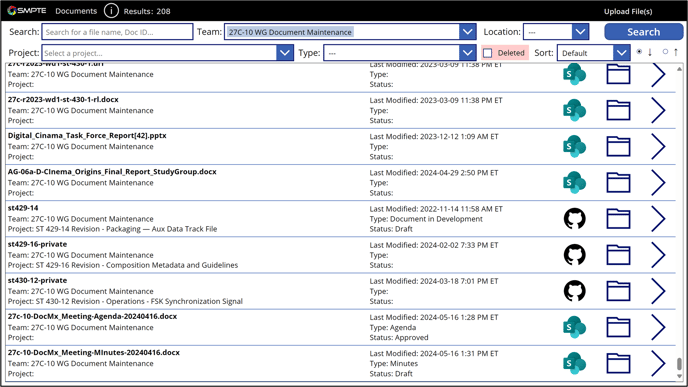
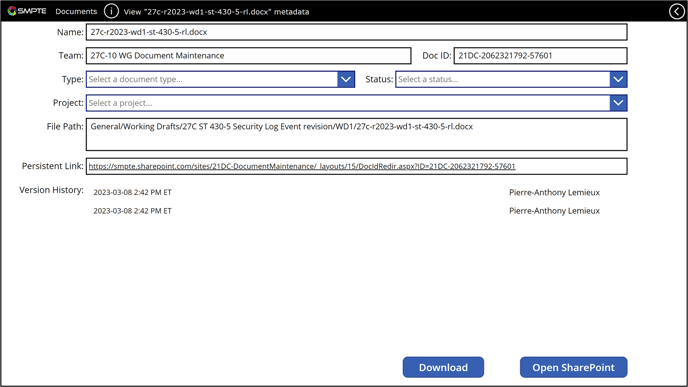
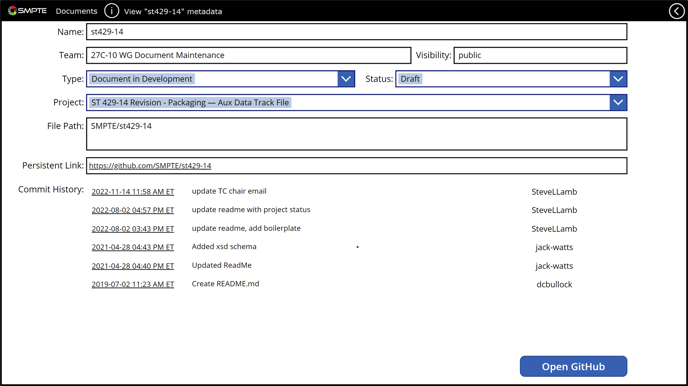
Clicking the file icon for one of the documents listed will take you directly to the file on SharePoint or the GitHub repository. Clicking the arrow will bring you to the documents detail page. There you can view the document metadata and adjust the metadata items for type, status and associated project. The page will also show you the version (SharePoint) or commit (GitHub) history of the document.
Below is the view of the documents detail page for a GitHub document:
 Below is the view of the documents detail page for a SharePoint document: