![SMPTE_logoWHITE-RGB-2.png]](https://www.smpte.org/hs-fs/hubfs/SMPTE_logoWHITE-RGB-2.png?height=40&name=SMPTE_logoWHITE-RGB-2.png)
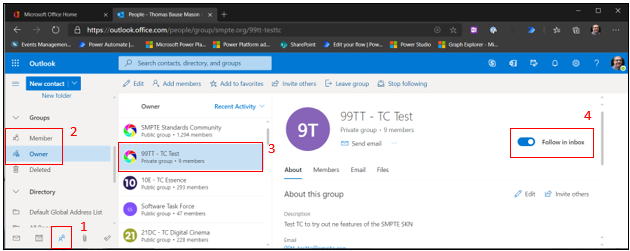
- You can follow your group emails in your SMPTE inbox. That way emails and meeting invites sent to a group your are a member of will not only show up in your outlook group but also in your general SMPTE inbox
- (1) Click on the People icon
- (2) Click on either “Member” or “Owner” depending on the status you have in a team aka group
- (3) Select the group aka team you want to change the setting for
- (4) Toggle “Follow in inbox” on or off