![SMPTE_logoWHITE-RGB-2.png]](https://www.smpte.org/hs-fs/hubfs/SMPTE_logoWHITE-RGB-2.png?height=40&name=SMPTE_logoWHITE-RGB-2.png)

Users can search the most recently published SMPTE documents on the main screen of the Library app. Superseded document version will not be shown. The document list can be filtered by Document Suite, Assigned TC, and Document Type. Sorting can be done by document number, date, suite, or document title.
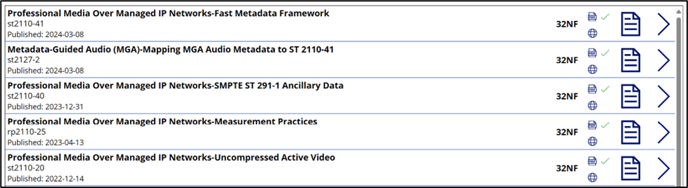
Clicking the document icon on the list will take the user directly to where the document is located on the online SMPTE document library webpage. It can then be opened there for review. Any superseded versions of the document are available there as well.
Icons, Globe for HTML and PDF Document for PDFs, next to the document names indicate what type of published documents are available, either PDF, HTML or both. A green check mark will be shown next to the icon depending on what document type is available.
Clicking on the arrow symbol on the right side of a document row will bring you to the Document Metadata View.