![SMPTE_logoWHITE-RGB-2.png]](https://www.smpte.org/hs-fs/hubfs/SMPTE_logoWHITE-RGB-2.png?height=40&name=SMPTE_logoWHITE-RGB-2.png)
- On the top of the screen you will find a control bar which allows you to switch on and off your microphone and/or camera.

- You can also raise your hand if you want to get into the que

- Or you can share you screen

- There is also a button to toggle on and off the participant list
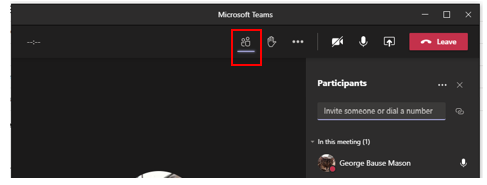
- Lastly, you can leave a meeting via the “Leave” button
