![SMPTE_logoWHITE-RGB-2.png]](https://www.smpte.org/hs-fs/hubfs/SMPTE_logoWHITE-RGB-2.png?height=40&name=SMPTE_logoWHITE-RGB-2.png)
As a P-Member you are obligated to actively participate in the work of the Technology Committee you are a P-Member of. Meeting attendance and Voting participation is essential to keeping your P-Member status. Please see the Standards Operations Manual OM to learn more about the eligibility requirements to maintain your P-Member status.
As previously mentioned, the SKN is currently using a Excel spreadsheet to capture the roster of a Technology Committee and the status of everybody on the roster (P-Member vs. O-Member). This spreadsheet is maintained by the TC chairs by analyzing the voting Excel spreadsheet (see “vote” further above) collected during ballots and votes and through the meeting attendance record by the Teams conferencing tools.
The results of that analysis are captured in the roster spreadsheet which is accessible in TC team in the general channel under the “Files” tab. Navigate to the “Roster” folder and open the spreadsheet contained in it.
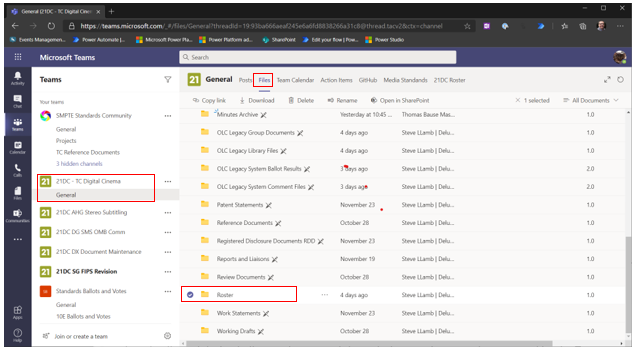
The spreadsheet is accessible by every TC member but it is read only and can only be altered by the TC chairs.
- Double click on the Excel spreadsheet. As a side note, this TC also has a quorum calculation spreadsheet in the roster folder.
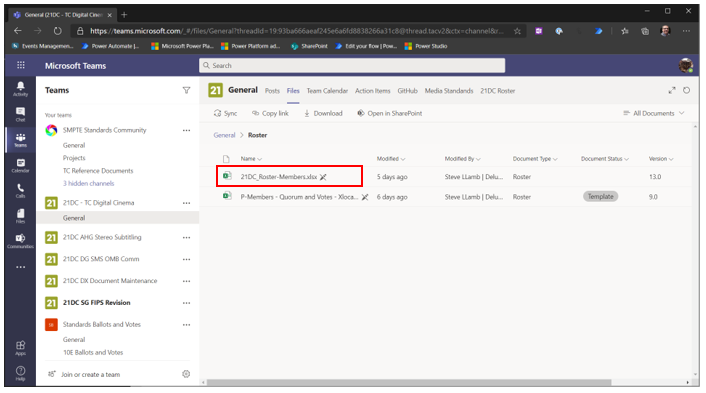
- You can review this spreadsheet, check your status and participation. Please notify the TC chairs if you see any discrepancies.
